Homeschool scheduling that fits how your family runs the day

Block times, relaxed parts of the day, anytime checklists, and loop rotations. Pick a rhythm per course and per child, and see it all in one day.

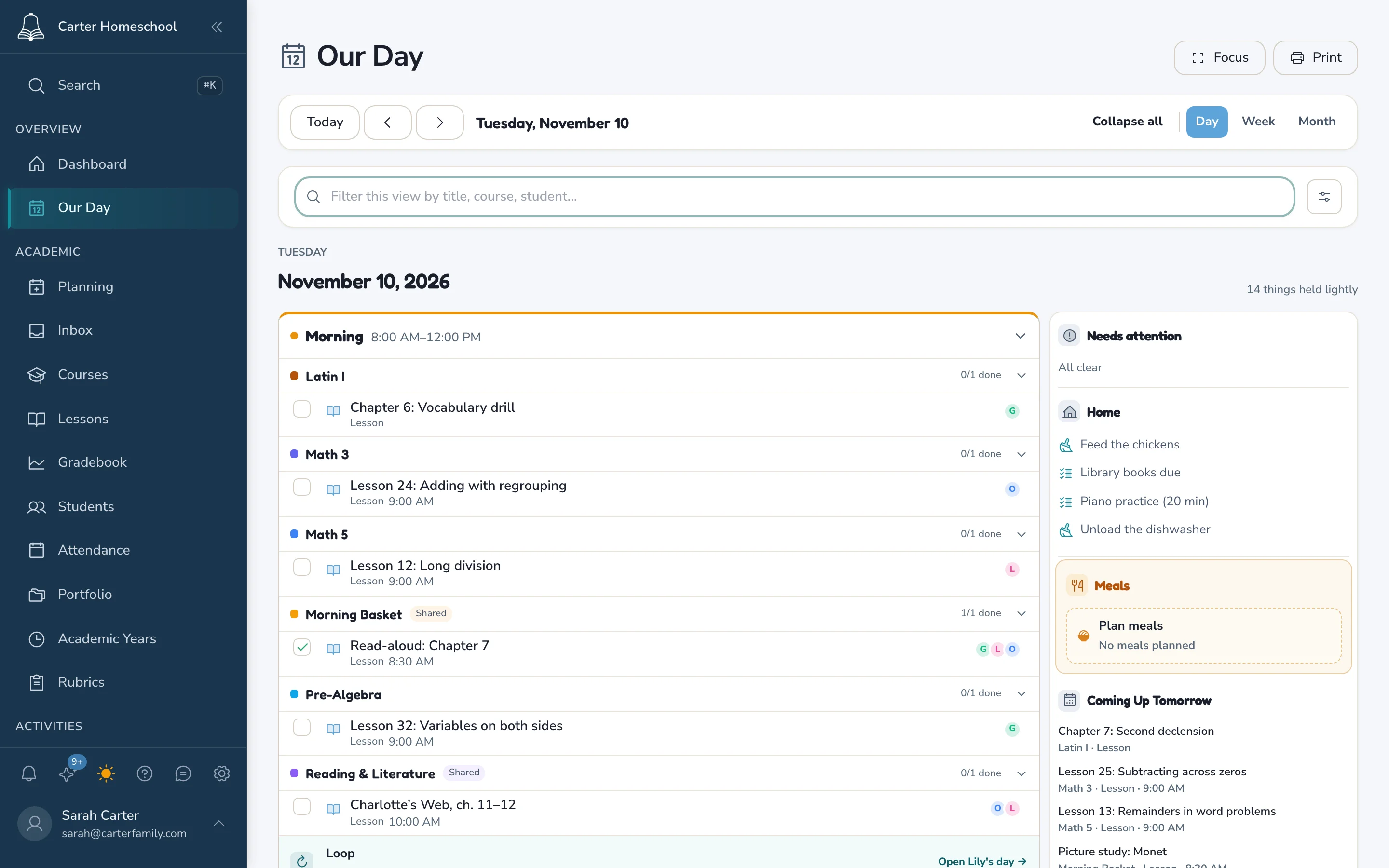
Homeschool Ace Our Day showing timed lessons, morning and afternoon parts of the day, anytime items, and loop subjects for each child

One family day. Timed lessons, parts of the day, anytime work, and the loop, together.

All four homeschool schedule types in one planner

Homeschool families tend to run the day one of four ways: by the clock, by parts of the day, by a checklist, or by a loop. Most real families use a mix. Math needs a set time, history fits in the afternoon, chores can happen whenever, and the beautiful extras like art and poetry only survive if they rotate. Homeschool Ace lets you set the rhythm on each course instead of forcing the whole family into one style, then shows every child one day that puts it all together.

Pick the rhythm per course

Block

Set times for the things that need them

Put math at 9:00 and co-op at 1:30. Timed lessons sit at the top of each child's day in time order, so the commitments are always clear.

Best for: Older students, co-op days, families who like a timetable.

Relaxed

Morning, afternoon, and evening instead of the clock

Place a course in a part of the day rather than at a minute. The day has a shape without a schedule that breaks the first time breakfast runs long.

Best for: Younger kids, slow mornings, families who want rhythm over routine.

Checklist

Here is today's work, do it in any order

Leave a lesson or chore unscheduled and it shows up as an anytime item on the day. Kids see the list, check things off, and own the order.

Best for: Independent learners and the student who wants to choose.

Loop

A rotation that never falls behind

Put art, poetry, nature study, and music on a loop and pick how many come up each day. Finish one and the loop moves on. Miss a day and nothing is late.

Best for: Charlotte Mason and Morning Time families, and every subject that keeps getting skipped.

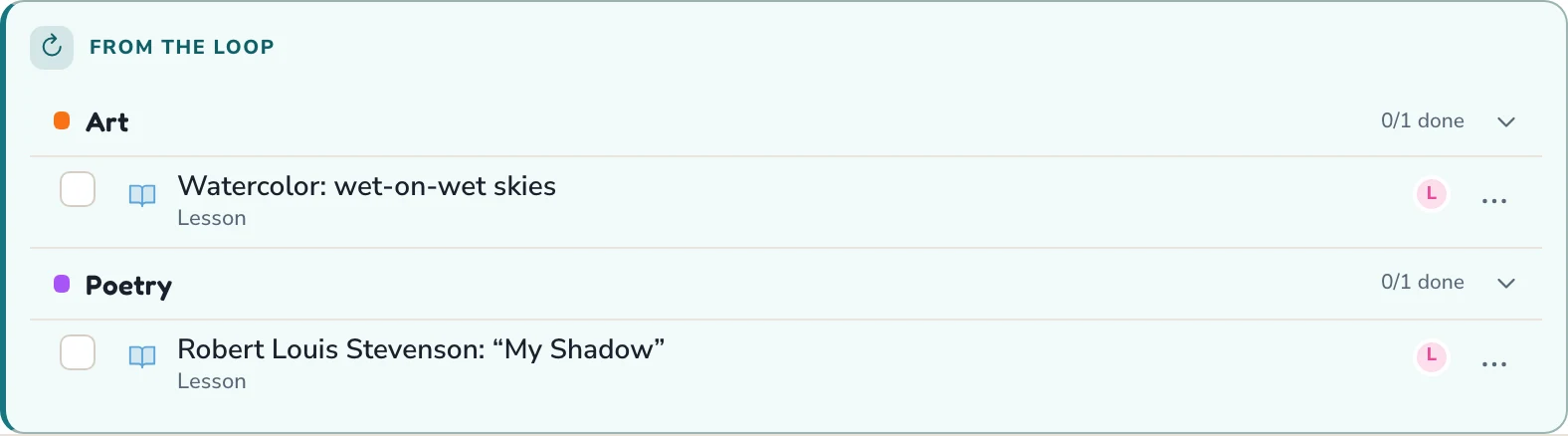
The From the Loop section in Homeschool Ace Our Day, showing today's Art and Poetry loop lessons

LOOP SCHEDULING

The loop keeps your place for you

Switch a course to a loop and it joins that child's rotation. Each day the next loop subjects show up under the dated work, marked From the Loop. Finish one and the loop moves on. Pass on one today and it comes back. Have a good morning and do one more. No paper clip on the checklist, and no subject that quietly disappears for a month.

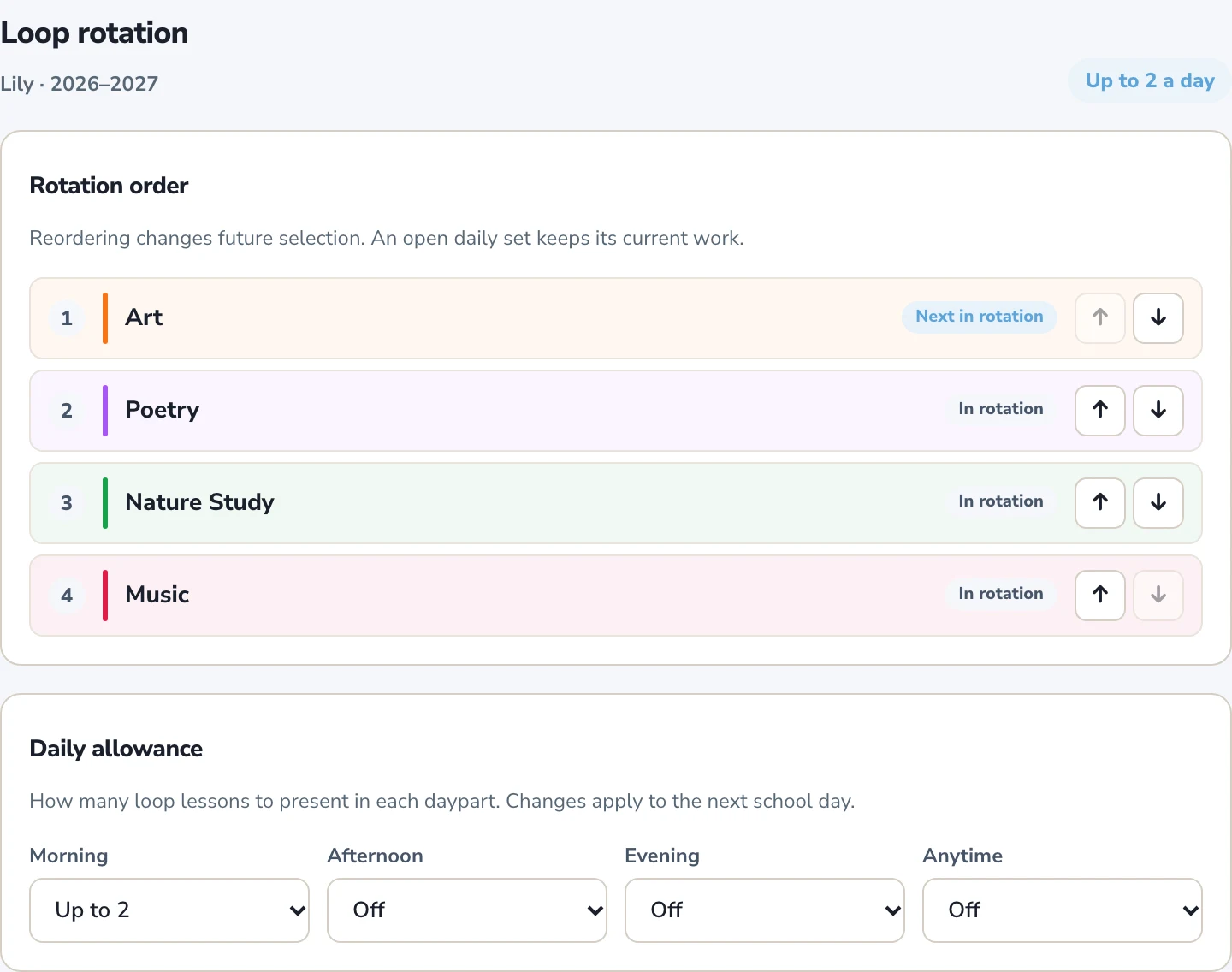
Homeschool Ace loop builder showing a child's rotation order and how many loop subjects come up each morning

SET IT UP ONCE

Order the loop and pick how many a day

In Planning, put the loop in the order you want and choose how many subjects come up in each part of the day, like two in the morning. Change your mind next term and drag them around. A course can move between dates and a loop any time, and its lessons, grades, and records come with it.

How to set up your homeschool schedule

  1. Build your courses and enroll each child who is taking them.
  2. Schedule the daily work on dates, then give lessons a time or a part of the day where it helps.
  3. Leave anything that can happen whenever as an anytime item.
  4. Switch the rotating subjects to a loop and choose how many come up each day.
  5. Run the day from Our Day, where each child sees their timed work, their parts of the day, and their loop together.
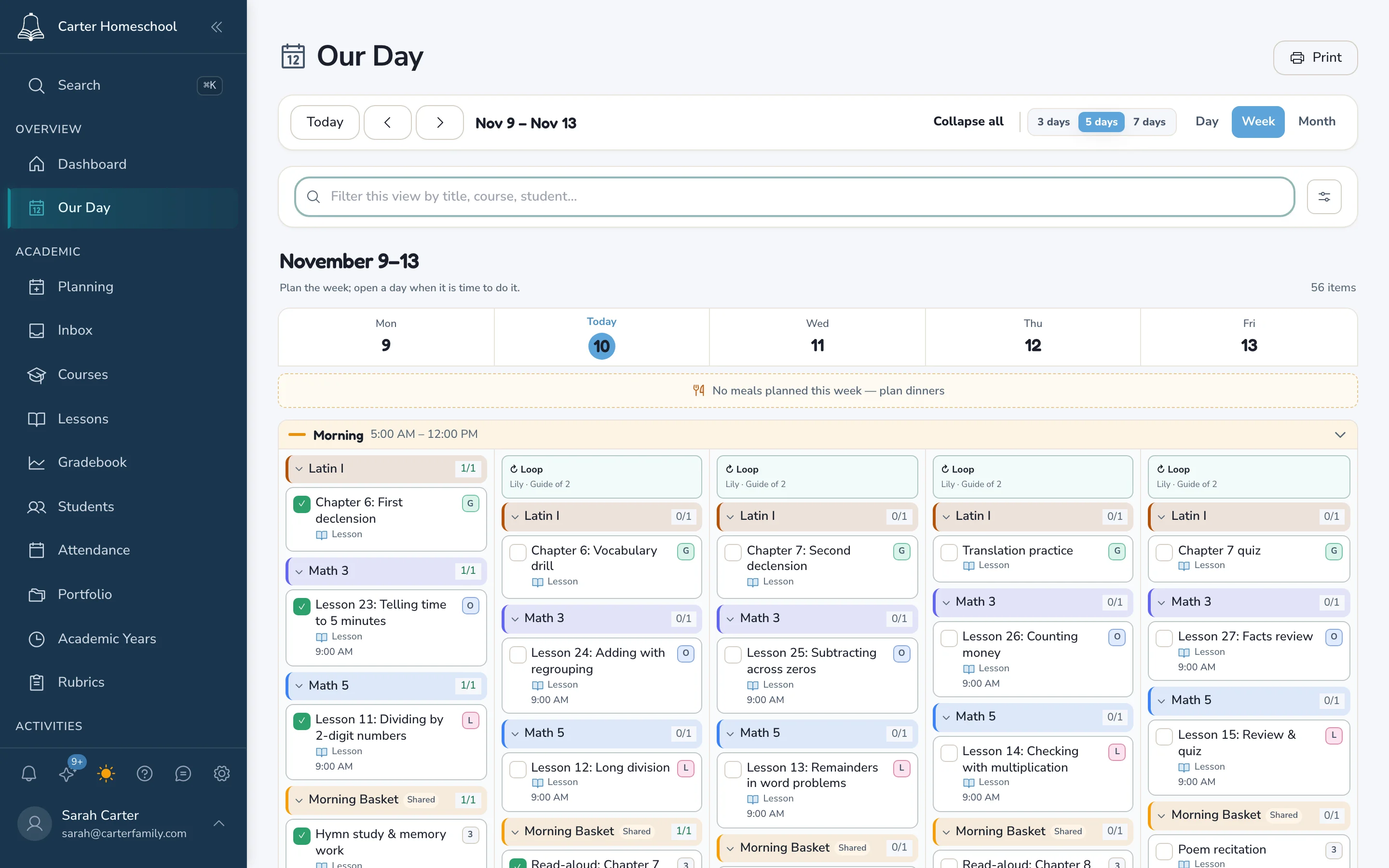
Homeschool Ace week view showing each day's lessons by part of the day

The week at a glance, by part of the day.

Who it is for

Families who have tried a strict timetable and watched it fall apart by Wednesday. Charlotte Mason and Morning Time families who already loop on paper. Parents with a high schooler on a schedule and a six-year-old who is not. If your homeschool runs on more than one rhythm, the planner should too.

Frequently asked questions

What are the four types of homeschool schedules?
Most homeschool schedules fall into four styles. Block scheduling sets subjects at specific times. Relaxed scheduling uses parts of the day like morning and afternoon instead of the clock. Checklist scheduling gives a list of the day's work to do in any order. Loop scheduling rotates subjects in order a few at a time, so a missed day never puts you behind. Many families mix them.
Can I use more than one schedule type at once?
Yes. In Homeschool Ace the rhythm belongs to each course, not to the whole family. Math can be at 9:00, history can live in the afternoon, chores can be anytime, and art and poetry can be on a loop, all in the same day. Each child sees one combined day.
Does Homeschool Ace support loop scheduling?
Yes. Switch any course to a loop and it joins that child's rotation. Choose the order and how many loop subjects come up each day, and in which part of the day. Each day's loop subjects appear in Our Day below the dated work. Completing one moves the loop along, and you can pass on one for today or do one more if you have time.
What happens to grades and records on a loop?
Nothing changes. A loop lesson is a full lesson. It opens the same way, can be graded the same way, and counts in the gradebook, attendance, and records exactly like a dated lesson. The only difference is how it gets onto the day.
Can different children have different schedules?
Yes. Each child has their own day, and a loop is per child. One student can be mostly on a timetable while a younger sibling runs on parts of the day and a loop, and the parent still sees the whole family in one view.
Is there a free loop schedule template?
Yes. Our free homeschool loop schedule maker builds an ordered loop from your subjects, works out the next few weeks of loop days, and prints a checklist. No signup required.
Keep going

Run the day your way.

Timetable, parts of the day, checklist, or loop. Set it per course, and let every child's day put it together, with grades and records built in.

30-day free trial, no credit card.