Homeschool Lesson Planner

Build a course once, schedule its lessons across your calendar in seconds, and run every student's day from one place.

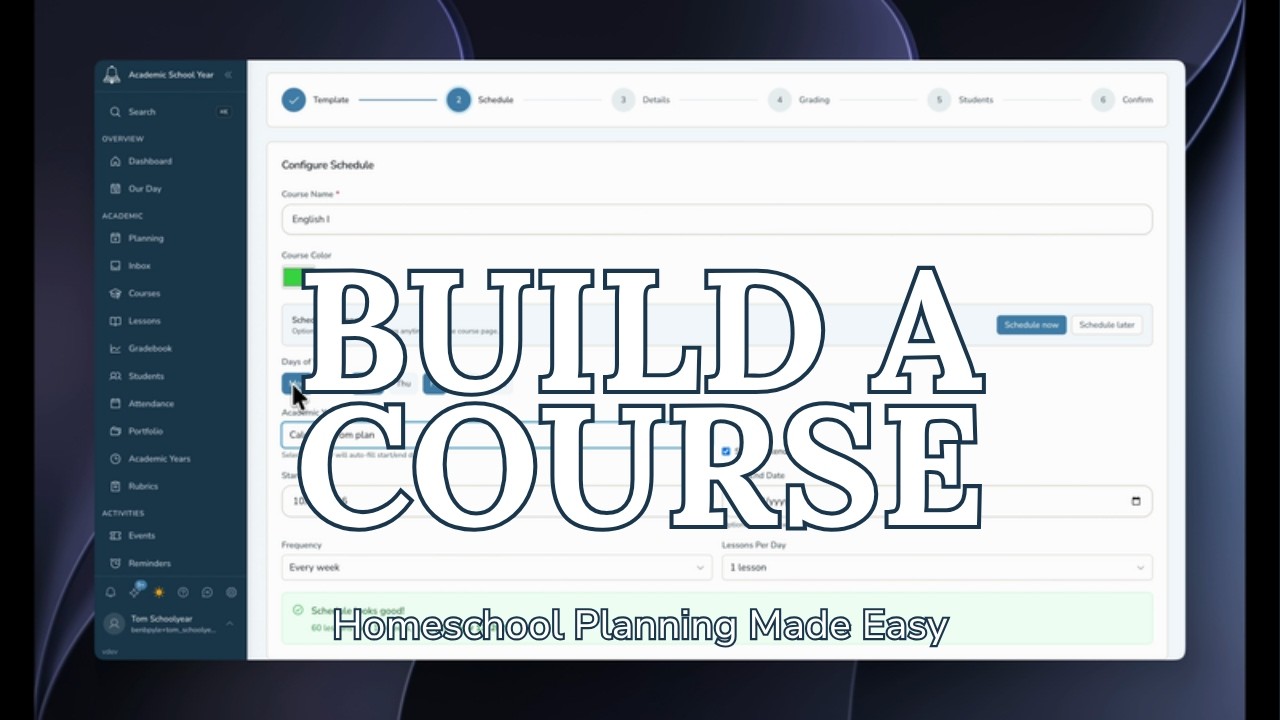
Homeschool Ace lesson planner walkthrough: scheduling a course onto the calendar

Watch a whole course get scheduled onto the calendar in seconds.

An online homeschool lesson planner

Homeschool Ace is a homeschool lesson planner where you build a course once, then schedule its lessons across your calendar and run them from a single daily view. Name a course, add its units and lessons or start from a template, then assign dates to the whole course at once instead of dragging lessons one by one. The scheduled lessons show up per student on the day they are due, right alongside assignments, chores, and meals. It is part of the all-in-one Homeschool Ace app, so your plan sits next to your grades, attendance, and records instead of living in a separate spreadsheet.

What you can do

Build a course

Name it, pick a subject and color, enroll your students, then add units and lessons, or start from a template.

Schedule in seconds

Assign dates to a whole course at once (pick school days, frequency, and lessons per day) instead of placing lessons one by one.

The plan flexes

Reschedule by moving lessons. When your week changes, the plan flexes with it instead of breaking.

One daily view (Our Day)

Scheduled lessons show up per student on the day they are due, alongside assignments, chores, and meals.

Unlimited students included

Enroll every child who is learning a course, with every student on one family plan at no extra cost.

Part of the all-in-one app

Your lessons live alongside grades, attendance, and records, so the whole homeschool day stays in one place.
How to plan a homeschool course

  1. Build a course: name it, pick a subject and color, enroll your students, then add units and lessons, or start from a template.
  2. Schedule the whole course at once by choosing your school days, how often you teach, and how many lessons per day.
  3. Let the planner assign dates to every lesson in the course in a single step, instead of placing them one by one.
  4. Reschedule by moving lessons when your week changes; the rest of the plan flexes around them.
  5. Run the plan from Our Day, where each student sees their scheduled lessons on the day they are due, next to assignments, chores, and meals.

Building a course, step by step

Homeschool Ace walkthrough: building a course with units and lessons

See a course built from the ground up, units and lessons included.

Who it is for

It is built for homeschooling parents planning several subjects, several kids, or both, who want to plan once and not re-plan every day. If you are tired of placing lessons one at a time or rebuilding the same schedule each year, you can build a course once, schedule it in a single step, and let each student's day fill itself in. With unlimited students included, one family account covers every child.

Frequently asked questions

How do I plan a homeschool year?
Start by building a course for each subject: name it, pick a subject and color, enroll your students, then add units and lessons or start from a template. Once a course holds its lessons, schedule the whole thing at once by choosing which days of the week you teach, how often, and how many lessons per day. Homeschool Ace lays the lessons across your calendar so the year is planned without placing each lesson by hand.
How do I make a homeschool schedule?
In Homeschool Ace you schedule a course rather than individual lessons. Pick the school days, the frequency, and the number of lessons per day, and the planner assigns dates to every lesson in the course at once. When your week changes, move the lessons and the rest of the plan flexes around them.
Can I reuse lesson plans each year?
Yes. You can start a course from a template, so a course you have built once becomes a reusable starting point for the next student or the next year instead of rebuilding it from scratch.
How do I plan homeschool for multiple kids?
Build a course once and enroll every child who is learning it, then schedule it in a single step. Each student gets the scheduled lessons on their own day in Our Day, so you plan once instead of re-planning per child. Unlimited students are included on every plan, so one family account covers all of them.
How far ahead should I plan homeschool lessons?
Many families plan a full course or a full academic year up front, because scheduling a whole course at once makes that fast. Because the plan flexes when your week does, planning far ahead does not lock you in: when life moves, you move the lessons and the rest of the schedule adjusts around them.

Keep going

Planning lessons is one part of the homeschool day. These tools and pages cover the rest.

Plan your homeschool year today.

Build a course, schedule it in seconds, and run every student's day from one place, all inside the all-in-one Homeschool Ace app with unlimited students.

30-day free trial, no credit card.